Disney Plus is one of the major players in the streaming battle royale game, and it has some visually stunning shows. But there’s nothing more torture than watching classics like Avengers: Endgame or The Little Mermaid on your phone screen or laptop. So, how do you stream Disney Plus on your TV?
The service is compatible with most devices on the market, so you’ll have no trouble streaming Disney Plus shows and movies on your home TV. How you go about it depends on the platform you choose, but you have a lot of options. So, let’s dive into how to stream Disney Plus on your TV.
No matter which streaming method you use, you’ll need a Disney Plus subscription before you can access anything on the service. If you are not registered, you can subscribe on this website.
How to connect Disney Plus with your TV
- Make sure your TV is linked to a reliable internet connection before turning it on.
- Search and install the Disney Plus app in the app store of your smart TV.
- Your screen will display a unique eight-digit activation code after finishing the Login procedure.
- Now go to a different computer or mobile device and open ”disneyplus.com/begin”
- Get into your account by using the same username and password on your smart TV.
- The activation code will be requested on the following page.
- Select “Activate” once you have entered your eight-digit activation code
- Your account will be enabled on your Smart TV when you input the proper code.
If you don’t have another device that can log in, there are also browsers on some TVs or game consoles that can access disneyplus.com/begin, but you need to use the remote control or game controller to enter the account password to log in.
How to cast Disney Plus on TV
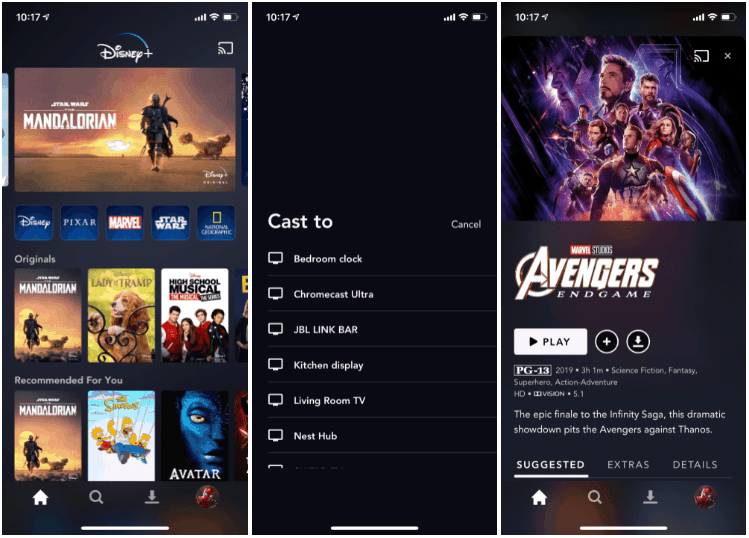
For those big brands of smart TVs, you can easily get the Disney Plus app from their app stores. But if your smart TV doesn’t support this, you can try to download Disney plus from Google play or other APK resource website. If that doesn’t work, you can still use your phone or PC to cast Disney Plus on your TV with Chromecast or other screen mirroring apps.
- Open the Disney+ app
- Select your favorite movie or TV show
- Tap on the Chromecast icon at the top right
- Select your TV from the list of sources
- The movie will start playing on your TV
To log in to Disney Plus on the game console, the steps are basically the same as on the smart TV.



-1.png)
Leave a Reply